

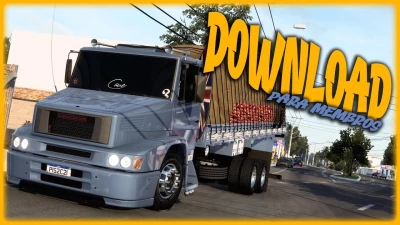


The "MB 1620 JuniorGamer Rua Mods" for Euro Truck Simulator 2 (ETS2) is a highly sought-after mod by the Brazilian community, especially those who enjoy more classic, low-riding trucks. It's known for offering a rich customization experience and a look reminiscent of the trucks that roam Brazilian roads.
### Features of the MB 1620 JuniorGamer Rua Mods:
This Mercedes-Benz 1620 mod, developed or made available by channels such as "JuniorGamer Rua Mods" (and frequently shared by others, such as "Claudio Gamer Oficial" and "Vanderley Simulador"), typically includes:
* **Detailed Modeling:** The truck is well-reproduced, with attention to both exterior and interior details.
* **Various Chassis Options:** It's common to find the 1620 with a variety of chassis, including "trucked" options (with more axles) and those that allow customization to lower the chassis, as is popular in Brazil.
* **Engines and Transmissions:** Engine and gearbox options that simulate the performance of the original 1620, often with realistic "chip-like" sounds or characteristic roars.
* **Extensive Visual Customization:**
* **Exterior Accessories:** Bumpers (including the "mustache" design), headlights, taillights, exhaust tips (like the "boiadeiro" design), owls, PX antennas, beacons, and stickers (including those from "JuniorGamer" itself).
* **Interior:** Custom seats, steering wheels, and even GPS options.
* **Paint Colors and Details:** Possibility to choose from several colors, and sometimes, specific decals.
* **Invisible/Rigid Cargo:** Many 1620 mods are designed to be rigid trucks (with a fixed body), and therefore, it's common for them to come with or require the use of an **invisible cargo mod** to transport goods in the game. This allows you to place cargo directly on the truck's bed.
* **Realistic Sounds:** One of the highlights is the audio, with engine roars and horns that increase immersion.
-
### Where to Find and How to Install:
You can find the MB 1620 JuniorGamer Rua Mods mod at:
* **YouTube Channels:** Channels like "Claudio Gamer Oficial," "Vanderley Simulador," and others focused on ETS2 mods often post videos showcasing the mod and provide the download link in the description. It's important to check the video date and the game version the mod is compatible with.
* **ETS2 Mod Sites:** Some websites specializing in Brazilian mods for ETS2 may have this truck available.
#### **How to Install:**
1. **Download the mod file:** The mod usually comes in `.scs` format. If it's in `.zip` or `.rar` format, you'll need to extract it to get the `.scs` file(s).
2. **Move to the "mod" folder:** Paste the `.scs` file(s) into the `Documents\Euro Truck Simulator 2\mod` folder.
3. **Activate the Mod Manager:**
* Open Euro Truck Simulator 2.
* In the main menu, go to **"Mod Manager"**.
* Find the "MB 1620 JuniorGamer Rua Mods" mod in the list (or whatever name the creator gave the file).
* Double-click to activate it (it will move to the right column).
* Click "Confirm Changes."
4. **Purchase the truck:** In-game, go to a **Mercedes-Benz dealership** or a **mod dealer** (if there's one specifically for mods you've activated) and look for the MB 1620.
**Important tip:** Always check the **mod version's compatibility with your game version**. Outdated mods can cause crashes or bugs. Also, if the mod is for a rigid truck, look for an **invisible cargo mod** compatible with your version of ETS2 so you can use it with cargo.
Have you tried downloading this mod before, or do you have a specific version of ETS2 in mind?
 Report file


COMMENTS
There are no any comments
Write a comment