



E-Log System with Login – Download & Use Guide🔧 What’s Included
Login Screen (any username/password accepted)
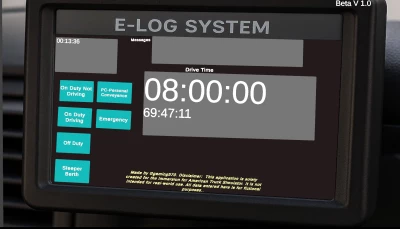
Main E-Log Dashboard (with timers: Driving, On Duty, Off Duty, 70-Hour Clock)
Status System (updates your current duty status on screen)
Data Display using Unity UI & TextMeshPro
Fully integrated scene transition from Login → E-Log system
🛠️ What Was Modified
LoginManager.cs
Accepts any username and password (no authentication needed)
Loads the ELogScene automatically when login is successful
Displays error message if either field is empty
Scene Management
Login scene added as the first scene in Build Settings
Scene transition handled with SceneManager.LoadScene("ELogScene")
Canvas UI Fixes
Ensured InputFields are on top of the background using correct Canvas sorting order and hierarchy
Fixed issue where text box was hidden behind UI background
🧠 How to Use
Launch the app
Enter any username and password
Press Login
The system will load into the E-Log dashboard
Track hours, statuses, and timers
Status changes update UI and logic in real-time
💾 Optional: Save System (Coming Soon)
A save/load system will allow driver logs to persist across sessions using:
PlayerPrefs (basic save)
or JSON file save (for multi-user, detailed data)
📦 E-Log System with Login – Download & Use Guide
🔧 What’s Included
✅ Login Screen (any username/password accepted)
✅ Main E-Log Dashboard (with timers: Driving, On Duty, Off Duty, 70-Hour Clock)
✅ Status System (updates your current duty status on screen)
✅ Data Display using Unity UI & TextMeshPro
✅ Fully integrated scene transition from Login → E-Log system
🛠️ What Was Modified
LoginManager.cs
Accepts any username and password (no authentication needed)
Loads the ELogScene automatically when login is successful
Displays error message if either field is empty
Scene Management
Login scene added as the first scene in Build Settings
Scene transition handled with SceneManager.LoadScene("ELogScene")
Canvas UI Fixes
Ensured InputFields are on top of the background using correct Canvas sorting order and hierarchy
Fixed issue where text box was hidden behind UI background
🧠 How to Use
Launch the app
Enter any username and password
Press Login
The system will load into the E-Log dashboard
Track hours, statuses, and timers
Status changes update UI and logic in real-time
💾 Optional: Save System (Coming Soon)
A save/load system will allow driver logs to persist across sessions using:
PlayerPrefs (basic save)
or JSON file save (for multi-user, detailed data)
 Report file
 Donate with Paypal

COMMENTS
There are no any comments
Write a comment