

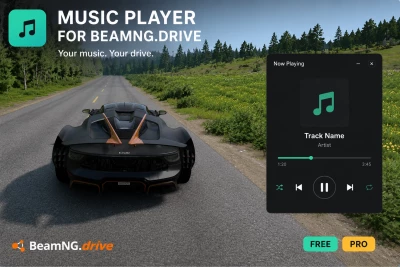


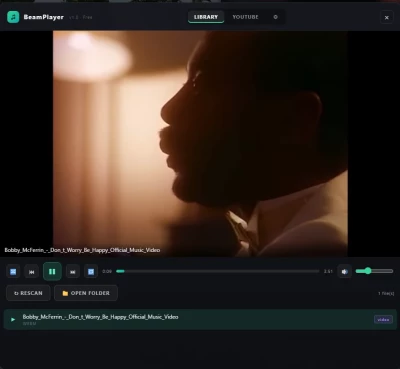
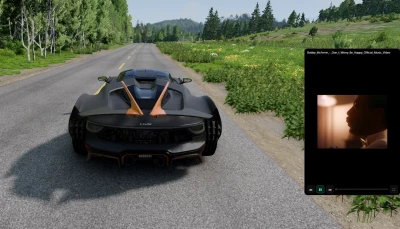
Listen to your own music, watch your own videos, and play YouTube — all inside BeamNG, in a movable overlay you can keep on screen while you drive. A compact “now playing” widget expands into a full player, and video keeps playing in that little widget, so you can actually watch on the road.
Dear friends, if you want to use YouTube Download function, please read the description carefully, because the first-time installation is a bit complicated!
There are 2 version of the mod:
1.0 — free for all, without YouTube download function.
v1.1 PRO — only for T2+ patreons for now.
Toggle
Toggle it any time with Alt + B.
Features
Your own music: play MP3, OGG, FLAC, WAV and Opus from a folder, with a full playlist — play/pause, next/previous, shuffle, repeat, seek bar, volume, mute.
Your own video: play video right in the game; the picture also shows in the compact widget, so you can keep watching while you drive (picture-in-picture).
YouTube in-game (Pro): paste any YouTube link and watch it in BeamNG with full sound and zero lag. This is the headline feature — details below.
Movable, resizable overlay: a small now-playing widget that expands to a full panel; put it and size it wherever you like.
Remembers your settings: volume, shuffle, repeat between sessions.
Clean dark UI: Alt + B hotkey.
Installation — Very important!!!
- Download BeamPlayer.zip.
-
Put it in your BeamNG mods folder:
C:\Users\<YOU>\AppData\Local\BeamNG\BeamNG.drive\current\mods\
Or use the in-game Repository → Install from disk → and pick the zip.
- Launch BeamNG, open the UI Apps editor, and drag BeamPlayer onto your screen once.
- Press Alt + B to show or hide it any time.
How to add your own music/videos
-
Click OPEN FOLDER on the Library tab — it opens your media folder:
...\BeamNG.drive\current\beamplayer_media\
- Drop your files in, then press RESCAN in the app.
- Click a track to play.
Audio: MP3, OGG, FLAC, WAV, Opus.
Video: .webm VP8.
BeamNG’s built-in browser cannot decode .mp4 / H.264 — convert your videos to .webm. The Pro pack includes a one-click converter.
YouTube In-Game Function — PRO-only — THE MUST-HAVE
BeamNG’s interface cannot stream YouTube live — it is blocked at several levels and would stutter anyway. BeamPlayer solves it the reliable way: it downloads the video and plays it locally, so you get the full picture, full sound, and zero lag, and it even plays in the compact widget while you drive.
One-time setup, about 2 minutes
- Install BeamPlayer.zip using the steps above.
- Double-click SETUP_YOUTUBE.bat, included in the Pro download, once.
It will:
- Auto-download the tools it needs: yt-dlp + ffmpeg, about 120 MB, one time.
- Install a tiny background helper that starts automatically with Windows.
Your antivirus may ask about yt-dlp — it is the standard YouTube downloader. Allow it.
Done — you never touch it again.
How you use it
- In-game, open the YOUTUBE tab.
- Paste any YouTube link.
- Click DOWNLOAD & PLAY.
In about 30–60 seconds the video downloads, converts, and starts playing by itself — with sound, in the player and in the widget.
Paste several links in a row — they process one after another.
Everything you download is saved to your library, so it is there next time too.
Friends, make sure youtube_dl is running — you can find it in the beamplayer_media folder, otherwise the YouTube download function will not work!
Editions
BeamPlayer Free: the full local player — your music and video, playlist, widget, all controls. Free for everyone.
BeamPlayer Pro: everything in Free, plus in-game YouTube download and play. Supporting on Patreon unlocks it and keeps the mod updated.
Tips and Troubleshooting
Reload after changes: in-game press Ctrl + U, then Ctrl + F5 a couple of times. A normal restart does not refresh the UI cache.
Video lags? Open beamplayer_media\youtube_dl.bat, change WIDTH=640 to 480 or 360, and re-download.
YouTube does nothing? The background helper must be running. It auto-starts after SETUP; you can also run youtube_dl.bat. Its window shows the progress.
An .mp4 will not play — that is expected. BeamNG cannot decode H.264. Use .webm; the included converter does it in one click.
Requirements
BeamNG.drive recent version, Windows.
Local music and video: nothing extra needed.
YouTube Pro: the one-time SETUP downloads yt-dlp + ffmpeg for you.
 Report file


COMMENTS
There are no any comments
Write a comment