



New to FPV drones
FPV drones are hard to fly just starting out, but it's rewarding once you get the hang of it. By default 3D mode is enabled, which makes the lower half of the throttle spin the motors backwards. This is not how FPV drones work, the motors can only spin one way. 3D mode makes it much easier to fly with a game controller.
Setup
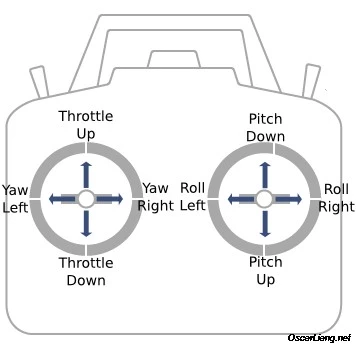
Go to Options > Controls > Camera, scroll to the end of the list. Set "FPV Toggle Menu" keybind and "FPV Throttle", "FPV Yaw", "FPV Pitch", "FPV Roll" with Throttle = LeftStick Up/Down, Yaw = LeftStick Left/Right, Pitch = RightStick Up/Down, Roll = RightStick Left/Right. Optionally set other keybinds. Close options(left stick wouldn't work if you don't) and open the FPV menu with the keybind you set. Confirm the input display at the top of the app displays correctly. You may need to invert some axes.
To use the drone cycle camera modes until you get to the fpv camera mode. To reset the drone near your car press "Center camera" button. You can put any value in a slider by Ctrl+LeftClicking on it and typing in the value.
Github page: https://github.com/sug44/beamngFPVDrone
If you found a bug or have suggestions, you can contact me on discord: sug4#3152.
 Report file


COMMENTS
There are no any comments
Write a comment