

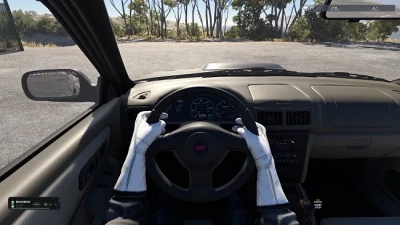
The HOTW mod adds a visible animated driver to BeamNG.drive: he has a full body, arms that follow the movements of the steering wheel, and legs that interact with the pedals.
Beta 0.3.0 introduced character selection, color customization, head movements, improved pedal support, and the ability to save individual configurations. Support for BeamNG.drive 0.40 and Enhanced Interior Camera mod were also added, additional calibrations were included, and further performance improvements were made.
Loading and installation
Download the ZIP archive that comes with this digital product.
1. Close BeamNG.drive.
2. Place the ZIP file in the «mods» folder located inside your active BeamNG.drive user folder. There is no need to unpack the archive.
3. Remove old versions of HOTW ZIP archives from the «mods» folder so that only one active version remains.
4. Start the game.
Landing setup
- Open the pause menu (Pause) → «Mods» (Mods) → «HOTW Settings» (HOTW Settings) and enable Editing mode on the tab you want to configure.
- Body (Body): Select the driver's position and adjust the curve and width of the elbows. After changing any of the elbow sliders, first press «Apply» (Apply) and then — «Save» (Save).
- Hands: adjust the position and rotation of each hand individually.
- Legs (Feet): adjust the position and rotation of each leg to operate the gas, brake and clutch pedals (if provided in the vehicle).
- Character: Select a character and customize their clothing, accessories, and skin and hair color. To confirm the color change, click «Apply color».
- Press «Save» (Save) to commit the settings, or «Cancel» (Cancel) to cancel the changes made.
The body, arm, leg, and character configurations are maintained independently of each other. Body position is maintained for each vehicle model, hand settings — for each steering wheel, and foot settings — for each pedal. The character selection is saved separately, while the color options selected for it are also saved.
For vehicles using the same handlebars, the hand position settings will be common. Standard calibrations are provided, however manual adjustments may be required for some vehicles or configurations.
The foot position is tied to the vehicle pedal animation; the system uses either standard calibrations or the settings you set. If your legs don't display correctly, use the «Feet» section to manually adjust them.
You can also separately enable or disable the display of body, head, arms and hands. In cockpit view mode (including «Enhanced Interior Camera), the character's head is automatically hidden so as not to obscure the view. In first-person view, head movements follow the direction of your gaze, while in external views — the character's head turns towards the camera.
- 0 Likes
- 0 Comments
- 23 Downloads
-
 23
Downloads in
23
Downloads in
-
 1 hour ago


 Report file
 Donate with Paypal

COMMENTS
There are no any comments
Write a comment