

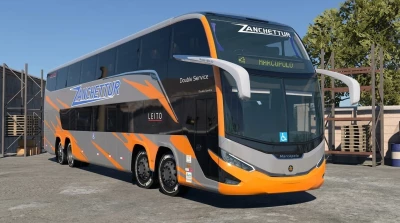
The Marcopolo Paradiso G8 1800 DD is a flagship double-decker luxury coach from Brazil. This mod brings it to BeamNG.drive. Enjoy your own music, utilize voice-guided navigation, and take advantage of automatic route planning during bus missions.
Features:
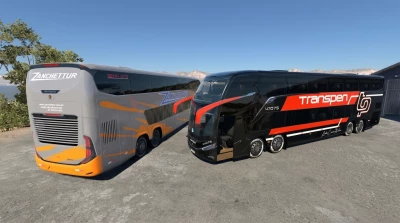
- 33 configurations, including stock versions, 30 liveries from Brazilian operators, and chassis-only (cab-and-chassis) variants.
- Scania 12.7L DC13 engines (360 hp and 500 hp).
- 8-speed Scania Opticruise transmission.
- Fully functional multi-axle setup with steerable tag and middle axles.
- Air suspension with a "kneeling" function and Scania Drive modes (Economy, Standard, Power).
- Front destination display (functional in bus missions) and operational sliding doors.
- Steel or painted wheels, various tire options, JATO rockets, and nitrous oxide (NOS).
- Detailed interior featuring passengers, a digital interactive Scania dashboard, and screens displaying the next stop.
- Interactive cockpit: clickable steering wheel buttons, parking brake lever, volume control, cruise control, interior lighting, A/C fan, reversing alarm, and differential lock controls.
- 3 steering wheel styles and a calibrated multi-speaker interior audio system. - Touchscreen Infotainment Center: A music player with playlists, a photo app with wallpaper support, and a navigation system featuring turn-by-turn voice guidance and automatic route planning for bus missions.
- Optional voice assistant for providing directions, announcing stops, and delivering dashboard alerts.
C6g3 Infotainment Services (recommended):
A small companion application that runs alongside the game. It allows for loading music and images from outside the game directory, supports a wider range of audio formats, and enables the voice assistant. It is also required for using shortcuts that point to folders located outside the BeamNG user folder or the game directory. The Infotainment Center will still function without it, but with limited features.
Adding Music:
Open the "Music" app and click the "+" button next to the queue (in the top-right corner), then select "Open Music Folder." Place your music files into this folder and click the refresh button on the Infotainment Center screen. Subfolders will appear as playlists (ensure "Use Folders" is enabled). You can also add Windows shortcuts (.lnk) that point to music folders located anywhere on your PC.
Adding Images and Wallpapers:
Open the "Photos" app and click "Open Images Folder" at the top. Place your images into this folder and click the refresh button on the Infotainment Center screen. Subfolders will appear as albums; Windows shortcuts (.lnk) work here as well. To set a wallpaper, open any image and select "Set as Wallpaper."
Keyboard Override:
Press Ctrl + F12 or tap the on-screen keyboard icon to type on the Infotainment Center using your physical keyboard. Press it again to return keyboard control to the game. Installation Instructions
Download the mod and do not extract it. Open the game launcher, but do not click "Launch." Select "Manage User Folder," then "Open User Folder," and navigate to the "mods" folder. Place the mod file there without extracting it.
- 0 Likes
- 0 Comments
- 17 Downloads
-
 17
Downloads in
17
Downloads in
-
 1 hour ago


 Report file


COMMENTS
There are no any comments
Write a comment