

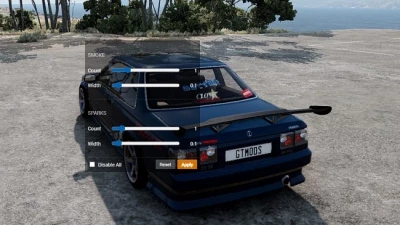


A user interface application that allows you to adjust the amount of smoke and sparks, as well as disable all friction particles.
The smoke and sparks sections each have two sliders:
- Count - the number of particles in the effect
- Width - the "radius" of the effect, which also affects the density.
The recommended settings are shown in the image; high Count values can significantly reduce performance.
After adjusting the sliders, click Apply - your machine will reboot and the changes will be applied.
A reset button is located nearby - it returns the effect values to the defaults.
A "Disable all" checkbox has been added; it allows you to disable all effects related to surface friction and collision; in some scenarios, this can have a positive impact on performance.
 Report file
 Donate with Paypal

COMMENTS
There are no any comments
Write a comment