



Start Options
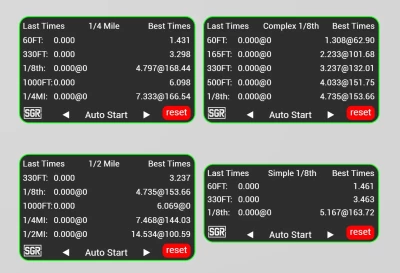
Each app features a start type selection at the bottom, allowing you to choose from four different options:
Auto Start
The default and most commonly used option.
The timer begins recording as soon as the vehicle exceeds the target speed.
Transbrake Start
Requires the transbrake to be released and the target speed to be hit to start the timer.
Clutch Start
Functions like the transbrake start but requires the clutch to be released instead.
Foot Brake Start
Works similarly to the transbrake start but is triggered by releasing the foot brake.
These options are ideal for vehicles with unstable jbeams or setups prone to excessive shaking, ensuring accurate timer functionality regardless of the situation.
Timer Options
You can select from four different timer types to track elapsed times and speeds at various distances:
1/4 Mile Timer
14app.png
60 ft ET
330 ft ET
1/8 mile ET @ speed
1000 ft ET
1/4 mile ET @ speed
1/8 Mile Timer
18app.png
60 ft ET
330 ft ET
1/8 mile ET @ speed
1/8 Mile Full Timer
18capp.png
60 ft ET @ speed
165 ft ET @ speed
330 ft ET @ speed
500 ft ET @ speed
1/8 mile ET @ speed
1/2 Mile Timer
12app.png
330 ft ET
1/8 mile ET @ speed
1000 ft ET
1/4 mile ET @ speed
1/2 mile ET @ speed
Additional Features
Best Times:
The best times for each timer are displayed on the right.
Best times are specific to each timer and reset only when the reset button is clicked.
Start Type Independence:
The selected start type is unique to each timer, allowing for maximum customization.
 Report file


COMMENTS
There are no any comments
Write a comment