



Changes v1.3.1:
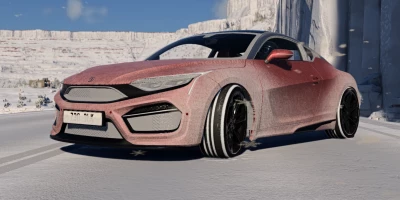
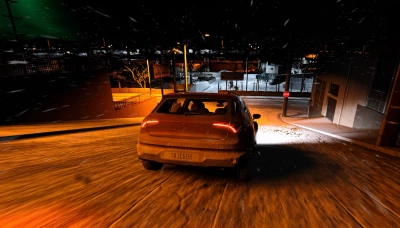
Snow on cars, rebuilt:
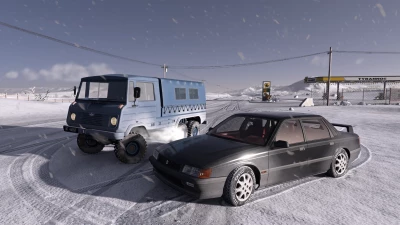
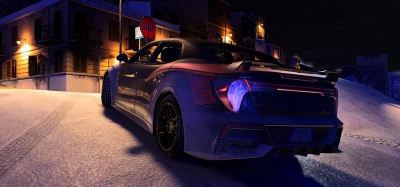
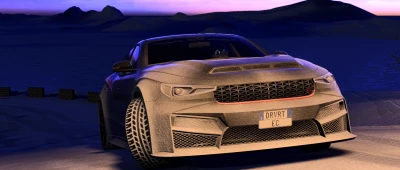
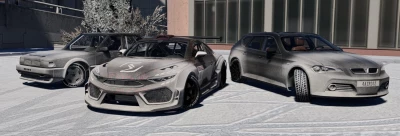
- Car grime is drawn in a completely new way: the snow is a layer of its own over the bodywork, so it works on any paint and any livery, mod cars included. It bends with the car when the car is damaged.
- It builds up where the wheels throw it, heaviest round the wheel arches and along the lower body
- Lit like real snow: it takes the sun, reflections and the lights of your own and other cars, with a soft sparkle on thick snow.
- Snow on your lamps dims them: headlights and other lamps under snow shine less until it melts off.
- No snow inside the car
- Keep snow when changing vehicle (new setting): a car swapped for another model or config keeps the snow it carried.
Weather:
- Northern lights: part of the Winter weather. They fade under cloud and heavy snowfall. Switch and brightness are with the other winter sky options.
- Heavier blizzards: the Blizzard end of the snowfall now has up to four times as many flakes, Let me know if this causes performance issues!
World:
- No snow under roofs: covered ground such as gas station forecourts and garages stays dry, and drives dry.
- Distant trees issues hopefully fixed, black boxes and rendering issues!
- Switching the mod off in the Mod Manager now puts the map back right away instead of when you leave the map.
- Fixed Vulkan not cleaning up Map.
Performance:
- Switching snow on and off is much quicker: Optimized how the mod loads snow.
- Traffic spawning and car resets no longer stutter: setting up snow on a new car is spread over several chunks, and cars of a model already on the road are ready almost at once.
- Smoother play while distant trees are prepared after a map loads.
- Snow on cars needs no more paint projectors, which held a lot of video memory.
- Faster tyre ruts.
Fixes:
- Distant bushes and trees turned black or orange after changing map.
- Switching snow off left snow on roads, plants and roofs, and every switch on stacked another layer, Fixed on Vulkan as said above.
- Tyre tracks disappearing in chunks, This is fixed somewhat, Im most likely going to redo tyre tracks to be more performant and work a bit more realistic.
Known issues:
- Car grime and Snow on wheels are still beta: some mod cars and tyres take no snow, or take it in the wrong places, Will be hopefully out of beta next update, I want to update the wheels aswell so they are more realistic.
- Switching snow on can still freeze the game for about a second on big maps while it rebuilds the collision, longer with Frozen water on.
Features:
- Realistic snowfall: the correct shape of snowflakes in layers of depth, from a light snow flake to a blizzard.
- One snow level for the whole world: shallow, light, dense or deep.
- Snow-covered roads that vary depending on the level: wet asphalt with snowy edges, slush between the lanes, clean ruts with snow ridges between them, dense snow with dark ruts and, finally, a completely snow-covered area.
- Deep snow off the roads: smooth fluffy snow, into which the wheels dig and slide.
- Road modes: snow (follows the level), snow removal (wet road with a small amount of remaining snow next to deep snow) or without snow (map's own roads and traction).
- Traction follows: wet roads, then snow and slippery ice.
- Frozen water: lakes, rivers, and sea ice that you can ride on.
- Snow on everything: terrain, trees, bushes, rocks, roofs and sidewalks.
- Tire tracks: Your vehicles leave tire tracks in the snow. Fresh snow slowly covers them until they disappear.
- Winter weather: clear blue sky in dry weather, clouds and fog that form due to snowfall, and deep blue nights. Switch clouds, fog, sky color, blue night and cold separately or leave your own map lighting.
- Sound: crunching and sliding of tires on snow.
How to use:
- Install the mod and download any map.
- Open Snow Weather from the pause menu, the Mods tab.
- Select snowfall and snow level; everything else is optional.
- Turn on the mod using the first "Winter on/off" switch.
- The cloud and fog sliders you have changed on the Environment panel will remain yours until you click Reset.
Settings:
- Snowfall: on/off and intensity (light, moderate, heavy, blizzard).
- Snow cover level (light coating, thin layer, dense layer, deep snow).
- Roads: snow-covered, cleared or without snow.
- Freezing of reservoirs (on/off).
- Tire tracks (on/off) and the time until they are completely covered with snow (from 10 seconds to 30 minutes).
- Weather: winter or standard for the map; the ability to separately include clouds, fog, sky color settings, "blue nights" and the effect of cold.
- Density, size and speed of snowflakes falling.
- The sounds of snow and wind, as well as their volume.
- Gusts of wind during a snowstorm that can move vehicles (disabled by default).
 Report file



COMMENTS
There are no any comments
Write a comment