

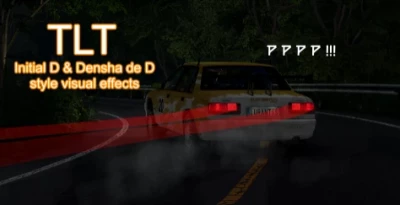
TLT
Initial D and Densha de D style visuals
From November to July it was in alpha; it has now reached full release and is waiting for you with a new version.
It was designed to be as customizable and user-friendly as possible.
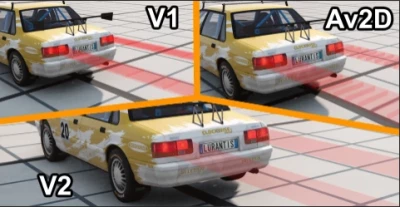
In short: it is designed to create visual effects using debug segments for Initial D fans.
It is optimized and includes a number of features designed to improve your enjoyment.
How to use:
1- As with other devices, you add the «Tail Light Trail» app from the uiapps BeamNG system to your screen.
If you're adding an app for the first time, or if you're adding one after you've created your car, reboot your existing cars with CTRL + R.
2- Press the red button «OFF» in the upper left corner of the application, then turn on the low beam headlights of your car.
3- Speed up a little in the car. When first used, the system uses 50/49/35 speed settings; if you want to change your speed settings, go to «Settings > Speeds A/B/C» in the application.
4-I will share a few videos showing how to use it once I have a free minute in the section below where the images are.
Features:
Global ON/OFF system:
A system has been created for Drift or Touge servers in Beammp that allows effects to be easily applied to other vehicles.
It includes a radar system that automatically turns the system on and off, a system that automatically turns the headlights on and off, and features that allow effects to be applied.
Hiding system:
This feature was designed to keep the speed effect from turning off when you press ALT+U while driving.
When you enable this feature, you will be able to hide the appliances of your choice.
Additional light trail and preservation system:
E-You can create different designs using an additional light trail system.
S-A save feature was added so you could save your settings; since V1 didn't have a save feature, you had to reconfigure the settings every time.
The saved settings are stored in the file "brakestrip_profiles.json" in the path below.
AppData\Local\BeamNG\BeamNG.drive\current\settings\brakestrip_profiles.json
Preview system and halogen system:
P-A preview mode has been added so you can easily adjust the alignment options without actually driving the vehicle.
When you enable this feature, the light trail is simulated as if you were driving a car.
The H-Halogen system was designed to support the gradual light-on system introduced in the latest BeamNG updates.
When you brake, it simulates the activation of halogen headlights, and the brightness of the light trail changes gradually rather than abruptly.
Speed effect:
A speed effect appears on the screen based on the A/C speed values you set in the A/B/C speed system.
It tries to give you a visual sense of how fast you're going.
Language system:
A language system has been developed for those who do not know a foreign language.
For example, a person who speaks only Turkish may not know English and may not understand how to use the app.
"Örneğin ben İngilizce bilmiyorum ve bunları çeviri uygulamasıyla yazdım."
"For example, I don't know English, so I wrote it using a translation app."
Alignment system:
It is impossible to create a system that automatically aligns with the brake lights of cars, so I have developed a system that allows us to align debug segments as we wish.
The titles in the sections describing the features on this page include informative images and videos explaining what they are used for.
Speed system A/B/C:
The system uses speed values.
A/B/C values are used for the light trail effect, A/C for the speed effect, and A for the manga-style text effect.
Manga-style writing system:
It is still in the prototype stage and was developed very quickly, so errors may occur.
While drifting at a 35-degree angle and a speed of 20–40 km/h, he creates manga-style text that stretches behind your car.
As I mentioned, this is a prototype version and is still being tested.
At the moment he writes only certain words.
Application theme and application settings:
A system has been developed that allows you to customize the appearance of the application as you wish.
You can set the color of the title bar to red and make the background completely transparent.
You can use the old name «BrakeStrip» and even enable or disable the feature that allows you to move the icon around the screen.
Icon mode:
The icon mode was designed so that it would not interfere with the view while driving.
When you click on text «TLT - V2.xx» in the application, it switches to icon mode and moves out of your field of view.
The AppTheme page has a lock icon that can be placed anywhere on the screen; once unlocked, you can drag the icon to your preferred location.
If you can't access the icon, press the é key to open the console, select the GE-Lua option in the lower left corner, then type bs "fix" in the console; this will move the icon to the center of the screen and free it from where it is stuck.
Exchange system:
It's designed so you can easily apply the light trail settings you've made to other vehicles.
When you press the «Copy» button on the A1 vehicle and then the «Paste» button on the B1 vehicle, the settings from the A1 vehicle apply to the B1 vehicle.
If you click the «Get Code» button in the upper right corner of the small page, you will copy the code in TLT-xxxx format; you can send this code to your friends and share your settings with others. To apply the code, paste it into the text box on the same small page and click the «Apply» button on the right. If the copied code starts with «BS-xxx», all you have to do is change the prefix «BS-» to «TLT-».
If you want me to create pre-configured settings for commonly used modified cars like CCF, Talent or Ae86, you can send me a code and I can include the settings in the mod.
SYNC system:
The changes you make to the app are different from car to car. That is why a synchronization system was added.
The change you make on the A1 vehicle (such as a normal mode color change) will not be applied to the B1 vehicle, but the changes you make may persist when you switch to the B1 vehicle.
To prevent this, an automatic sync system was added; if this does not work, you can sync manually using the SYNC button located to the right of the title in the app.
New features will be added to V2.1 and pre-registration will begin for modified vehicles.
I would like to thank everyone who tried the fashion in advance.
- 0 Likes
- 0 Comments
- 0 Downloads
-
 0
Downloads in
0
Downloads in
-
 1 hour ago


 Report file
 Donate with Paypal

COMMENTS
There are no any comments
Write a comment