

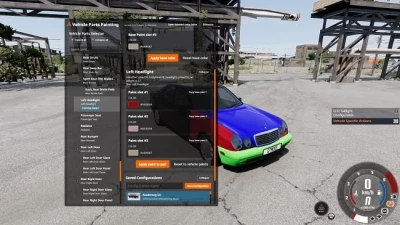


The mod adds a UI application that allows you to select any installed vehicle part and assign custom paint settings, matching the flexibility previously only available in Career mode.
Vehicle Parts Painting v1.1.7
Bring your builds to life with unique, colorful parts and truly unique cars!
- All custom paints are saved with the car configuration, so your creations are independent of the mod installed. You can freely share them with other players, and they will work just like native configurations.
- Custom paint can be applied to any car part, but the color will only appear on parts that support painting.
- In theory, this should also be compatible with BeamMP, as configurations are synced by the game - although multiplayer has not yet been tested.
Features
- Freeroam-compatible part paints - apply unique paint definitions to each installed car part without switching to Career mode.
- Real-time part highlighting - when you select a part in the interface, it is highlighted in the game world for easy identification.
- Full paint control - adjust the base color (including alpha channel), metallic, roughness, clearcoat, and clearcoat roughness values for each paint slot.
– BeamNG-friendly color editing – RGB sliders and number fields replace the unsupported browser color picker, providing reliable color selection in-game.
– Per-session color persistence – Custom paints are tracked on the active vehicle, so they can be reapplied after respawning within the same game session.
– Part search and filter – Quickly narrow down the part list by entering any part of the part name, slot label, or ID.
– Save and manage configurations – Create and delete custom vehicle configurations directly from the mod with automatically generated preview images.
– Compatibility with original configurations – All custom paints are stored in the standard vehicle configuration files, so they work without a mod installed and can be shared with other players.
Usage
1. Go to Applications and add the "Vehicle Parts Painting" feature.
2. Make sure the vehicle you want to edit is the player's active vehicle.
2. Open the "Vehicle Parts Painting" application.
3. Select a part from the list on the left
. 5. Change the paint values (RGB color, alpha, metallic, roughness, clear coat, clear coat roughness) for each paint slot.
6. Click "Apply paint to part" to apply the changes to the vehicle. Use the "Reset vehicle paint settings" function to return the entire vehicle to the current paint scheme.
 Report file
 Donate with Paypal

COMMENTS
There are no any comments
Write a comment