

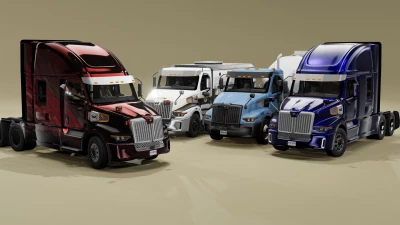


Western Star 57X Custom Mod Release
Take your simulation to the next level with the Western Star 57X Custom Mod! Whether you're hauling heavy cargo, dominating off-road terrains, or cruising the highways, this mod brings unmatched customization, realism, and style to your experience.
Features Include
✅ Authentic Engine Lineup
Original Western Star engines delivering unparalleled power and torque.
Realistic engine sounds, exhaust roars, and turbo whistle for a true-to-life feel.
✅ 47 Exclusive Configurations
Flame Edition
Iconic flame livery for a bold and eye-catching design.
Heavy-duty performance upgrades for optimal towing and hauling.
Spectra Blue Edition
Spectra blue paint with metallic accents.
Fully equipped sleeper cab with a TV, bed, and premium interior finishes.
Firetruck Rollback
Designed for emergency response scenarios.
Configurable body sizes with authentic rollback functionality.
...and 44 more configurations covering workhorse, off-road, luxury, and utility setups!
✅ Advanced Suspension & Physics
Tuned suspension for stability with heavy loads and rugged terrains.
Responsive handling for precision driving in all conditions.
✅ Interactive Parts with PBR Materials
Fully openable doors, hood, and interactive features for enhanced realism.
High-quality materials with reflective lighting for an immersive experience.
✅ High-Quality LED Lighting System
Bright, realistic LED headlights, taillights, and indicators.
Customizable light patterns for different scenarios, including highway and off-road.
✅ Good-Quality Interior
Detailed and customizable cabin with functional gauges and displays.
Comfortable seating textures and interactive controls for full immersion.
✅ High-Definition Textures
Authentic dirt, wear, and tear effects for realistic visuals.
Premium finishes for both exterior and interior details.
How to Install the Western Star 57X Custom Mod
Locate the Main Game Folder
Navigate to your BeamNG.drive installation directory:
C:\Program Files (x86)\Steam\steamapps\common\BeamNG.drive
Alternatively:
Open Steam.
Right-click on BeamNG.drive in your Library.
Select Manage, then Browse Local Files.
Extract the Mod Files
Open the downloaded mod's zip file.
Use an extraction tool (e.g., WinRAR, 7-Zip):
Right-click and select Extract Here or Extract to [mod name].
Move the Mod Files
Navigate to Documents\BeamNG.drive\vehicles.
If the vehicles folder doesn’t exist, create one:
Right-click, select New Folder, and name it vehicles.
Copy the mod's extracted vehicle folder into this directory.
Launch BeamNG.drive
Open the game and check the Mods section in the main menu to confirm the mod is enabled.
Look for the mod under Truck Configurations.
Spawn the Western Star 57X Custom and dominate the roads!
 Report file


COMMENTS
There are no any comments
Write a comment