

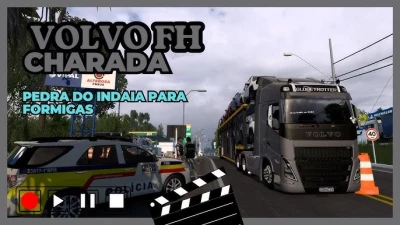


The term "Volvo Charada" in the context of Euro Truck Simulator 2 (ETS2) refers to Volvo FH truck mods (usually older generations, such as the FH16 Classic or the FH 2012) that have been extensively customized and "tuned" in the style that is popular in Brazil.
This "Charada" style usually includes:
Flashy paint jobs: Often with vibrant colors, complex graphics, or specific themes.
Exterior accessories: Lowered bumpers, extended side skirts, modified exhausts (such as "direct" or with chrome tips), PX antennas, various auxiliary lights (LEDs, additional fog lights, "foguinhos").
Custom wheels and tires: Chrome wheels, with hubcaps, or white-letter tires.
Interior details: Custom interiors with curtains, stickers, and other decorative items.
Custom sounds: Engines with a more aggressive roar or distinctive horns.
Where to find the "Volvo Charada" mod:
Like other heavy tuning mods for ETS2, the "Volvo Charada" is predominantly found through:
1. YouTube channels
Many Brazilian ETS2 modders and players create and share videos showing these trucks. They often provide download links in the video descriptions.
Search for: "ETS2 Volvo Charada download", "Volvo FH Charada mod ETS2", "Volvo FH Brasileiro ETS2".
What to expect: You will find both free versions (freely shared by smaller modders or older versions) and paid versions (created by modders or modding teams that invest more time and detail in modeling and customization, offering a higher quality and exclusive product).
2. Facebook and WhatsApp groups
ETS2 communities in Brazil are very active. In these groups, modders often share their work and links to download or purchase.
3. Mod Sites and Forums (less common for specific Charada)
Although there are general mod sites for ETS2, "Charada" mods, because they are very specific to Brazilian tastes and are often created by independent modders, are more easily found directly on YouTube channels or in social groups.
Important tips when searching for and using mods:
Version Compatibility: Always check the version of ETS2 for which the mod was developed. The game receives constant updates, and a mod made for an old version may not work correctly (or cause crashes) in a newer version.
Installation: Most mods come in .scs files. You will need to copy them to the Documents/Euro Truck Simulator 2/mod folder and then activate them in the Mod Manager in the game.
Quality: Free mods can vary greatly in quality. Paid mods often offer a higher level of detail and customization, as well as updates and support.
Trusted Sources: Always download mods from trusted sources to avoid corrupt or malicious files.
Do you already have a Volvo FH build in mind, or a specific "Riddler"-style detail you'd like to find?
 Report file


COMMENTS
There are no any comments
Write a comment