

A free mod manager for Euro Truck Simulator 2 and American Truck Simulator.
It displays mods from your local folder and the Steam Workshop, suggests an optimal load order, and explains—in simple terms—why your game might have crashed.
The interface is available in 16 languages.
Completely free. All features are available immediately, with no subscriptions, paid tiers, or "early access" restrictions.
You can curate your own mod collection using any mods from your game folder or the Steam Workshop; there’s no need for pre-made mod packs, and nothing gets overwritten.
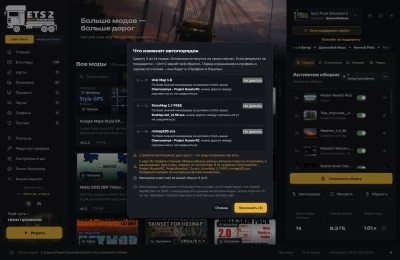
Automated load ordering with explanations. The manager suggests a load order and shows you exactly what will be moved—and why—before applying the changes. You can lock any mod in place using the "Do not move" button, and undo any action with Ctrl+Z. While it cannot guarantee 100% stability, the underlying database for load ordering grows with every version.
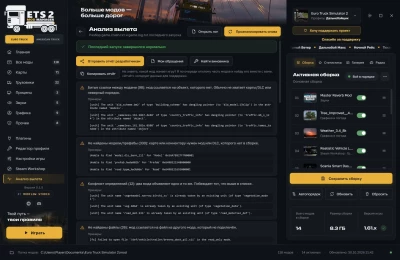
Crash assistance. When the game crashes, the analysis tool explains the cause in plain language. The "Find the culprit" feature helps you isolate the problematic mod by disabling parts of your collection one by one, and the "My support tickets" section lets you track responses from the developers.
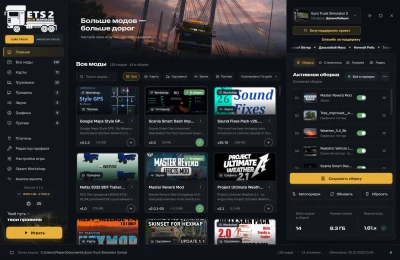
Everything in one window. Manage profiles and plugins, preview trucks and trailers in 3D, access radio stations, view statistics, create restore points, clone profiles, and update the software—all from within the application.
Launch the manager: it will automatically detect your game and profile.
Select your game (ETS2 or ATS) using the toggle below the logo.
Add mods to your collection by clicking the "+" button or by dragging and dropping mod cards into the right-hand column.
Click "Auto-sort," review the proposed changes and the reasons behind them, then apply.
Click "Save collection" to write the load order to your game profile.
Click "Play" or press F9.
 Report file