

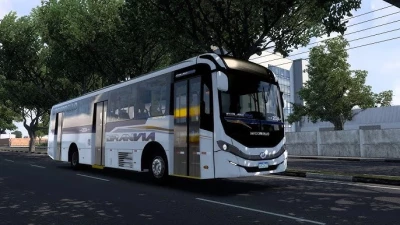


You're asking about the **Mascarello Granvia 2024 Multi-Chassis mod for Euro Truck Simulator 2 (ETS2)**! This is a very popular bus among Brazilian ETS2 players, known for its detail and versatility.
---
### What is the Mascarello Granvia 2024 Multi-Chassis ETS2 Mod?
This is a **community-created modification (mod)** that brings a highly detailed virtual version of the **Mascarello Granvia 2024 urban bus** into Euro Truck Simulator 2. The "Multi-Chassis" aspect means the mod allows you to choose from various real-world chassis options that this bus model is built upon, offering different engine, transmission, and suspension configurations. This makes for a more realistic and diverse driving experience.
---
### Key Features You Can Expect from This Mod:
* **High-Quality 3D Model:** Expect a very detailed exterior and interior, often with realistic textures and materials. Brazilian bus mods are frequently praised for their visual fidelity.
* **Multiple Chassis Options:** This is a highlight! You'll likely find chassis from manufacturers like:
* **Volkswagen (VW):** Such as the Volksbus 17.260S.
* **Mercedes-Benz (MB):** Including models like the OF-1619, OF-1726, or OF-1721L.
* These chassis choices directly impact performance, handling, and even the dashboard layout in some cases.
* **Realistic Sounds:** The mod will typically feature custom engine sounds, air brake sounds, door sounds, and other audio cues specific to the Granvia model and its various chassis.
* **Extensive Customization:**
* **Skins/Liveries:** A wide variety of real-world Brazilian bus company skins are usually included, along with editable templates. Many mods focus on companies from cities like Rio de Janeiro or patterns like BH (Belo Horizonte).
* **Interior Options:** Different seat fabrics, dashboard colors, and internal accessories.
* **Functional Elements:** Animated doors, wipers, realistic dashboard gauges, working GPS (often with a Waze-style interface), and even options like open hoods for screenshots.
* **External Accessories:** Options for mirrors, headlights, taillights (often LED), three-part bumpers, and various wheel choices.
* **Ergonomic Design:** The mod often aims to replicate the "Tablet Design" dashboard and improved ergonomics of the real Granvia 2024.
* **Compatibility:** Designed for specific ETS2 game versions (e.g., 1.49.x, 1.53, 1.54, 1.55). Always check the mod description for compatibility.
---
### Where to Find and Install the Mod:
1. **Modding Websites & Forums:** Search on popular ETS2 modding sites. Brazilian modding communities are very active, so look for sites and YouTube channels that specialize in Brazilian bus mods for ETS2. Some common places include:
* YouTube channels of mod creators (they often provide direct download links in video descriptions).
* ETS2-specific mod hubs (e.g., World of Mods, SCS Modding forums).
* Steam Workshop, though many complex bus mods are found off-Steam.
**Be cautious of unofficial download sites that might contain malware.**
2. **Download the Mod File:** You'll typically download a `.scs` file, or a `.zip`/`.rar` archive containing the `.scs` file(s).
3. **Installation Steps:**
* Navigate to your **Euro Truck Simulator 2 mod folder**. This is usually located at: `Documents\Euro Truck Simulator 2\mod`.
* **Copy** the downloaded `.scs` file(s) directly into this `mod` folder.
* **Launch Euro Truck Simulator 2.**
* From the profile selection screen, click on **"Mod Manager."**
* Find the Mascarello Granvia 2024 mod in the list. **Double-click it** or click the arrow to move it to the "Active Mods" list on the right.
* Ensure the mod is enabled and click **"Confirm Changes."**
* **Mod Order/Priority:** Sometimes, the order of mods in the Mod Manager can affect functionality. If you encounter issues, try adjusting its priority (moving it up or down in the active mods list).
---
### Important Tips:
* **Game Version:** Always verify that the mod is compatible with your current Euro Truck Simulator 2 version. Running an incompatible mod can cause crashes or glitches.
* **Conflicts:** If you use many mods, there's a chance of conflicts. If the bus doesn't appear or causes issues, try disabling other mods to isolate the problem.
* **Free vs. Paid:** While many mods are free, some high-quality or frequently updated mods might be offered as "paid" content by creators.
* **Read Descriptions:** Always read the mod's description or watch the creator's video for specific installation instructions, required game versions, and any known issues.
Driving the Mascarello Granvia 2024 in ETS2 can be a fantastic experience, especially if you enjoy urban routes or the feel of Brazilian public transport! Have fun!
 Report file


COMMENTS
There are no any comments
Write a comment