

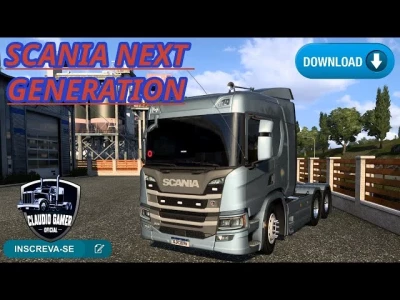


The term **"Next Generation Scania"** in the context of *Euro Truck Simulator 2* (ETS2) generally refers to the **Scania S and R series trucks** that were introduced into the game as part of a major update. These trucks are highly popular among players, and as a result, there are many community-created mods to enhance them.
These mods go beyond the standard game features, offering a wealth of new parts and options to make your truck unique.
### Common "Next Generation Scania" Mods
* **P, G, R, and S Series Reworks:** A very common type of mod, often created by modders like **Eugene**, completely overhauls the base game's Scania S and R series. These mods often add the smaller **P and G series cabs**, new chassis options (including rigid chassis for box trucks), and a huge variety of tuning parts that aren't in the base game.
* **Custom Dashboards and Interiors:** These mods focus on making the interior more realistic and customizable. You can find mods that change the font on the dashboard for better readability, add real-life accessories like GPS or radios, and introduce new textures for the steering wheel and seats.
* **Engine Sounds:** Sound mods are a huge part of the ETS2 modding scene. For the Next Gen Scania, you can find mods that replace the default sounds with much more realistic recordings of the **Scania DC13 (inline 6) or the powerful V8 engines**. These can dramatically improve the feeling of driving the truck.
* **Tuning and Accessory Packs:** These mods are all about adding more ways to customize your truck. They often include new bumpers, side skirts, exhaust pipes, roof horns, sunshields, and other small details that let you create a unique look for your truck.
### How to Install and Use These Mods
The process for installing most ETS2 mods is straightforward:
1. **Find a Reputable Source:** Look for mods on official community forums (like SCS Software's forum), the Steam Workshop, or well-known modding websites and YouTube channels. Be cautious of unofficial download sites.
2. **Download and Extract:** Download the mod file. It will typically be a `.zip` or `.rar` archive. You need to extract the `.scs` file from it.
3. **Place the File:** Copy the `.scs` file into your ETS2 mod folder, which is located in your documents folder: `Documents\Euro Truck Simulator 2\mod`.
4. **Activate in-game:** Launch ETS2, go to the **Mod Manager**, and activate the mod. If you have multiple mods, pay attention to the load order and priority to avoid conflicts.
5. **Customize Your Truck:** Visit a Scania dealership in the game to purchase or modify the truck with all the new parts.
 Report file


COMMENTS
There are no any comments
Write a comment