

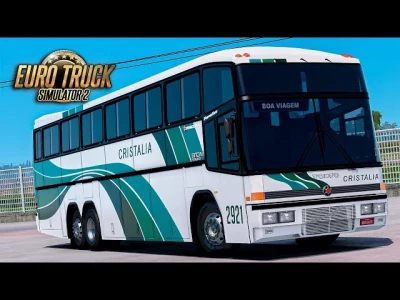


The **ÔNIBUS G4 SCANIA 6x2** is a popular bus mod for *Euro Truck Simulator 2* (ETS2), and the version from **DC3D** is particularly well-regarded in the Brazilian modding community. This mod is a favorite for players who enjoy driving classic Brazilian buses.
The "G4" refers to the Marcopolo Generation 4, an iconic model of bus, and the "SCANIA 6x2" indicates the chassis and engine configuration. The "1.55" specifies that this mod is designed to work with version 1.55 of ETS2. DC3D is a well-known modding group that often creates high-quality, detailed models of Brazilian vehicles.
### Key Features of this Mod
* **Detailed Model:** DC3D mods are typically known for their attention to detail, so you can expect a well-modeled exterior and a realistic interior with custom textures.
* **Customization:** Bus mods usually come with a variety of customization options. You can expect to change things like the paint, wheels, interior accessories, and even add custom skins from real-world bus companies.
* **Engine and Sounds:** The mod should include a custom Scania engine and a realistic sound pack to give you an authentic driving experience.
* **Passenger System:** Many bus mods, especially those compatible with newer versions of ETS2, include a passenger system that allows you to take on and drop off passengers, adding a new layer of gameplay.
### How to Get and Install the Mod
Mods like this are often distributed through third-party websites or are sold as premium mods on platforms like DC3D's own site.
Here's the general process for installation:
1. **Download:** Find a reliable source for the mod. Be cautious of unofficial download sites, as they may contain malicious files.
2. **Extract the file:** The mod will likely be a compressed file (`.zip` or `.rar`). You need to extract the `.scs` file from it.
3. **Copy to the mod folder:** Place the `.scs` file into your ETS2 mod folder, which is located in `Documents\Euro Truck Simulator 2\mod`.
4. **Activate in-game:** Launch ETS2, go to the Mod Manager, and activate the bus mod. Make sure its priority is set correctly, especially if you have other mods or maps.
5. **Start your journey:** Once in the game, you can purchase the bus from a truck or mod dealer and start driving.
Keep in mind that with bus mods, you may also need a compatible map mod or a passenger mod to fully utilize all the features, especially the passenger transport system.
 Report file


COMMENTS
There are no any comments
Write a comment