

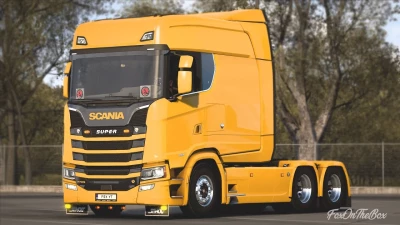


The **Scania S Longline** is a popular truck mod for *Euro Truck Simulator 2* (ETS2), known for its extended cabin and unique appearance. The mod is highly sought after by players who enjoy long-haul trucking and a more customized, realistic experience.
### Key Features of the Mod
* **Longline Cabin:** The main feature of this mod is the extended "Longline" cabin, which is significantly longer than the standard Scania S, giving it a distinct and powerful look.
* **Customization:** Mods like this typically offer a wide range of customization options, including different chassis configurations, engine options, interior accessories, and various cosmetic upgrades.
* **Realistic Elements:** The best versions of this mod often include custom engine sounds, accurate physics, and detailed interior models to enhance the overall immersion.
* **Version 1.55:** The "1.55" in the mod's name indicates that it is specifically designed to be compatible with Euro Truck Simulator 2 version 1.55. Using a mod that is not updated for your game version can lead to crashes or other issues.
### How to Find and Install the Mod
Mods like the Scania S Longline are usually found on dedicated modding websites or through YouTube channels that showcase and provide download links.
Here's the general process for installation:
1. **Download:** Find a trusted source for the mod. Be careful of sites that may contain malicious software.
2. **Extract the file:** The downloaded file will likely be a `.zip` or `.rar` archive. You'll need to extract the `.scs` file from it.
3. **Place in the mod folder:** Copy the `.scs` file into your ETS2 mod folder, which is typically located at `Documents\Euro Truck Simulator 2\mod`.
4. **Activate in-game:** Launch ETS2, go to the Mod Manager, and activate the Scania S Longline mod. Make sure to set its priority correctly, especially if you have other mods.
5. **Enjoy:** Once in the game, visit a Scania dealership to purchase and customize your new truck.
 Report file


COMMENTS
There are no any comments
Write a comment