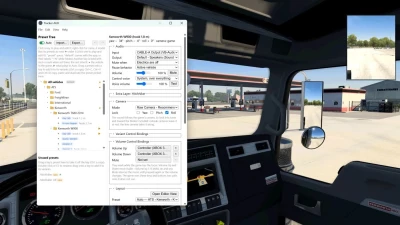


Trucker AUX plays any audio from your PC (Spotify, YouTube, a Discord call…) through virtual speakers inside your truck's cab. The speakers sit where real ones would, and the sound follows your head: look out of the side window and the door tweeter is now behind your ear.
Virtual audio cable driver required.
Features
Real head position: HRTF spatial audio synced with the in-game head. With the bundled camera plugin it also follows the game's look into turns and toward the blinker.
Any audio source: anything that can play into a virtual audio cable. Works with ETS2 Local Radio.
Ready presets for a long list of ATS and ETS2 trucks, switched automatically when you change trucks. Cabs of one model are told apart by the fifth-wheel position, and your own trucks are remembered by plate.
Visual editor: drag speakers on top and side views. Speaker types with crossovers: full range, small full range, tweeter, midrange, mid-bass, subwoofer.
Cab controls: keyboard or controller bindings to try preset variants while driving, plus Volume Up / Down and Mute.
Like a car radio (togglable): mutes while the engine or the electrics are off. A separate preset for the pause menu, with a smooth fade.
Extra layers: a second audio source from another seat at once, e.g. Discord through the "Hitchhiker" preset, like a passenger talking. Multiple virtual cables required.
Loudness matching between presets with different speaker counts.
Requirements
Windows 10 or 11
A virtual audio cable: VB-Audio Virtual Cable (free), Virtual Audio Cable (paid) or Steam Streaming Speakers
Plain stereo headphones. Turn virtual surround off (DTS Headphone:X, Windows Sonic, Dolby Atmos), or the sound gets virtualized twice.
Installation
Install a virtual audio cable.
VB-Audio - Has 1 free cable, extra cables (i.e. for routing your friend's Discord sound on Hitchhiker preset on top of sound system music) are dontaionware
Virtual Audio Cable - Paid
Steam Streaming Mic/Speakers - Installs automatically when setting up a Steam Link (Remote Play)
Download the latest release and extract it anywhere.
Run Trucker AUX → Help › Install game plugins (copies scs-telemetry.dll and trucker_aux_camera.dll into /bin/win_x64/plugins).
In the app: Input = the cable's output side, Output = your headphones.
In the Windows volume mixer, send your player to the cable's input.
Start the game, accept the SDK warning, drive.
 Report file