

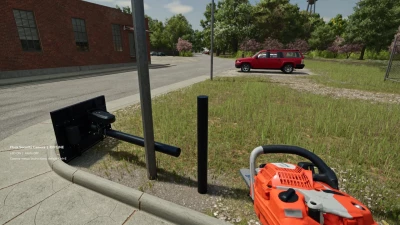
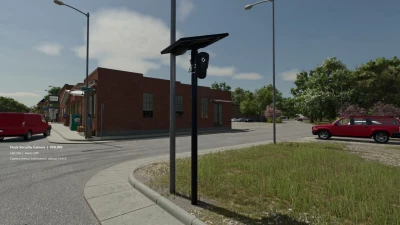
Brand: Flock
Model: Camera
Release Date: 9/18/26
Credits: Hashy
Located under the decoration tab in my store category!
Features –
Fully placeable security camera
Custom camera naming up to 40 characters
Working live camera view
Per-camera alert settings
Vehicle detection system
Other-farm vehicle detection option
Saved event history
Latest 30 events stored per camera
Adjustable LED modes
Activity LED on vehicle detection
Breakable / cuttable camera pole
Scripted chainsaw cutting system
Repairable after being knocked down
Camera settings save with your game
Fallen state saves with your game
Event history saves with your game
Multiple cameras can be placed and managed individually
Alert Options –
Off
All Vehicles
Other Farms Only
Damage alerts
20-second vehicle detection cooldown
LED Modes –
On
Activity
Off
Default Controls –
Left Ctrl + E — Camera menu
Left Ctrl + V — Live camera view / return to player
Left Ctrl + L — Change LED mode
Left Ctrl + R — Repair fallen camera
Esc — Leave live camera view
Controls can be changed through the Farming Simulator controls menu.
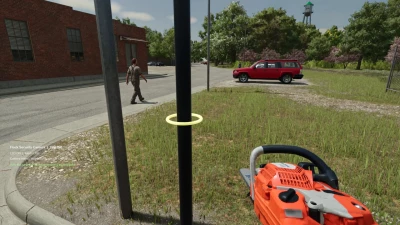
Cutting –
Equip a chainsaw
Approach the upright camera pole
Aim at the green guide ring
Hold the normal chainsaw cut control for 3 continuous seconds
The upper pole and camera will fall
The lower section stays in the ground
Move nearby vehicles away before repairing
Notes –
PC only
Alerts start OFF by default
Alerts are configured separately for each camera
Live view works while standing near the camera
Put your hand tool away before entering live view
Walking is disabled while viewing the camera
Camera view automatically ends if the pole falls
Fallen cameras do not detect vehicles or use the LED until repaired
No video files are recorded
Best tested on level ground
- 0 Likes
- 0 Comments
- 13 Downloads
-
 13
Downloads in
13
Downloads in
-
 1 hour ago


 Report file


COMMENTS
There are no any comments
Write a comment