

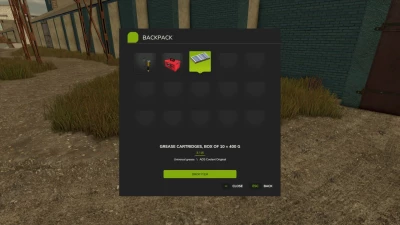
Inventory BackPack — Keep all your essentials with you!
V1.0.0.1
- Added localization in three languages: English, German, and Russian.
- Fixed occasional keyboard control conflicts on dedicated multiplayer servers.
- Improved the stability of the backpack keys (I and Y). Fixed cases where the keys stopped responding to presses in multiplayer games.
Tired of carrying items one by one? Constantly having to head back for things you’ve forgotten? Using an entire vehicle just to transport a few small objects?
Now, in Farming Simulator 25, you have your very own backpack!
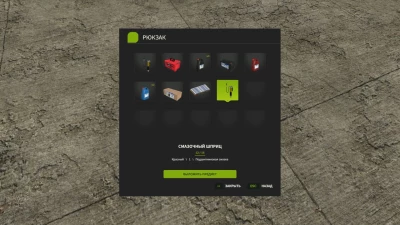
Inventory BackPack adds a personal inventory system with 15 slots to the game, allowing you to collect, store, carry, and retrieve compatible items whenever you need them.
Working in the fields? Servicing your machinery? Transporting small tools and accessories? Or simply want to keep your gear close at hand?
You no longer need to return to the farm every single time!
✨ What’s new in version 1.0.0.1?
🌍 New languages added! The interface now automatically switches between Russian, English, and German based on your game’s language settings.
🎮 Revamped control system! Key bindings for 'I' and 'Y' have been adjusted to minimize conflicts with vehicle controls.
🚜 Vehicle controls take priority while you’re inside a machine; backpack functions are restored once you step out.
🔧 Additional tweaks to ensure smooth control functionality in multiplayer.
The updated control system is currently undergoing testing on dedicated servers.
🎒 Key Features
📦 15 inventory slots — carry multiple items at once.
👨🌾 Personal backpack — each player has their own unique inventory.
🌐 Multiplayer support — designed for both single-player and co-op gameplay, including dedicated servers.
💾 Persistent storage — each player’s inventory is saved individually within every save game.
🖼️ Intuitive interface — displays item icons, names, and configurations.
🔢 Item stacking — identical items are grouped together, with the quantity clearly shown.
🖱️ User-friendly controls — select items using your mouse or keyboard. 🔧 Support for other mods — allows you to store compatible carryable objects from third-party modifications.
🚫 No cheats — you won’t be able to stuff a tractor, truck, or large piece of equipment into your backpack!
🚜 One backpack — many uses!
Heading out to work far from the farm? Take everything you need with you.
Need to move several small items? No more running back and forth for each one individually.
Using the Advanced Damage System? The backpack helps you carry compatible filters, tools, and consumables.
Inventory BackPack is a completely standalone mod. It does not require the Advanced Damage System or any other additional mod to function!
🎮 Controls
I — Open / close backpack (on foot).
Y — Place an item into the backpack.
Mouse / arrow keys — Select an item.
Enter — Remove the selected item.
Esc — Close the menu.
🌍 Supported Languages
🇷🇺 Russian
🇬🇧 English
🇩🇪 German
The interface language is determined automatically based on your game settings.
📥 Installation
Download `FS25_InventoryBackPack_for_Multiplayer.zip` from the "Assets" section below.
Place the ZIP archive into your Farming Simulator 25 `mods` folder.
Activate the mod in your savegame.
For multiplayer, ensure the same version is installed on both the server and all players' computers.
Note: Compatibility with specific third-party items may vary. Work on object physics and key bindings for dedicated servers is ongoing.
🎒 Less running around. More farming!
Game: Farming Simulator 25
Version: 1.0.0.1
Author: Vovainter
Platforms: PC
Languages: RU / EN / DE
❤️ Support & Feedback
Inventory BackPack is under active development! Found a bug? Have an idea for a new feature? Feel free to share your feedback via GitHub Issues.
The mod continues to evolve! If you’ve found a bug or have suggestions for improvements, please let us know in the GitHub Issues section.
Thank you for downloading and supporting Inventory BackPack!
Thank you for your support!
- 0 Likes
- 0 Comments
- 4 Downloads
-
 4
Downloads in
4
Downloads in
-
 43 minutes ago


 Report file


COMMENTS
There are no any comments
Write a comment