

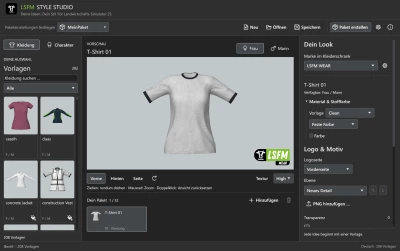
The LSFM Style Studio has undergone a comprehensive overhaul. The features of the previous Style Studio and the Facemodeler have now been combined into a single, unified application.
- New User Interface: A modern, Apple-inspired design featuring intuitive navigation, light and dark mode options, and consistent control elements.
- Integrated Head Editor: Head shapes and facial textures can now be edited together. You can combine facial photos, makeup, and custom head shapes.
- 53 Controls for Head Customization: Adjustments for face shape, eyes, nose, mouth, and skull structure. Additional fine-tuning controls under "Advanced" allow for subtle asymmetries as well as more detailed shaping of eyelids, lips, and the nose.
- Expanded Detail Catalog: A total of 56 templates, including 36 tattoos, eight scars, and 12 skin details—such as freckles, moles, pigment spots, and skin redness.
- Revamped Layer Management: Logo and detail layers now feature preview thumbnails. They can be reordered via drag-and-drop, toggled on or off individually, or deleted directly. You can also adjust position, size, rotation, opacity, and horizontal stretching.
- New Package Manager: Heads and clothing are organized clearly. Larger package cards make selection easier, and entries can be renamed or removed directly. Package names can now be up to 48 characters long.
- Custom Package Icons: A default icon is displayed, which can be replaced with your own DDS or PNG file. PNG files are automatically converted to 512 × 512 pixels (BC1/DXT1 format, without mipmaps).
- Streamlined Template Catalog: Templates are previewed first and are only added to a package once confirmed. Items already included are marked as such. NPC workwear and the fisherman’s outfit have been removed from the selection.
- Improved 3D preview: Clothing details are preserved at their original source resolution. Enhanced zoom and the ability to pan using the middle mouse button make inspection easier.
- More convenient hair and beard preview: Features a visual selection menu and separate color palettes for hairstyles and beards. These settings are for preview purposes only.
- Revamped photo and project editing: Includes webcam capture in the facial photo editor, improved photo blending around the nose area, and a step-by-step undo function for edits.
- New project overview: Projects from the previous Style Studio can be opened. A delete function and customizable project and export folders simplify file management.
- Revised export workflow: The save location is selected before the export process begins. Status windows display progress during loading and exporting.
- Smaller exported style packages: Optimized texture resolutions and appropriate DDS compression prevent unnecessarily large texture files, resulting in a smaller storage footprint for exported packages.
- Improved user interface: Compact, consistently arranged sliders and slim scrollbars with clickable directional arrows make editing more efficient.
- Compatibility and installation: Existing full-version licenses remain valid. Projects and exports are preserved during updates. When uninstalling, you have the option to remove the license; by default, it remains saved on your system.
- 0 Likes
- 0 Comments
- 4 Downloads
-
 4
Downloads in
-
 26 minutes ago


 Report file



COMMENTS
There are no any comments
Write a comment