

SmartWeight HUD – Keep an eye on weights and cargo
V1.0.0.3
With this update, your personal HUD settings are permanently saved. Additionally, weight calculations have been corrected for diesel and service tanks, as well as for trailers with limited physics mass. Wood load detection has also been added—including log count, wood volume, and correct data transmission in multiplayer.
PERSONAL SETTINGS
- All personal display options are retained after rejoining or restarting the server.
- The HUD's on/off state is also saved: if you turn the HUD off, it remains off the next time you join.
- Settings are saved per player in the respective LS25 user profile and are not overwritten by other players' settings.
- Existing older settings files remain compatible.
DIESEL AND SERVICE TANKS
- Weight calculations for visible integrated diesel, water, and other service tanks have been corrected for cases where the vehicle does not add their contents to its own physics mass.
- Transported fluids are treated as cargo and added to the displayed total mass.
- Consequently, the empty weight no longer decreases when filling these cargo tanks.
- The vehicle's standard, hidden fuel tank continues not to be treated as transported cargo.
- Tanks with mass calculation already enabled are not double-counted.
TRAILERS AND WEIGHT CALCULATION
- Fixed an issue where loading certain trailers caused the displayed empty weight to drop while the total mass remained capped at a limit.
- In cases of limited physics mass, the display now accounts for the full mass, comprising the vehicle's base weight, additional component loads, and wheel weight.
- As a result, empty weight, cargo weight, and total weight align correctly, even with heavy loads.
- This correction applies only to the display; the driving physics and weight limits defined by the game or vehicle remain unchanged. LOG TRANSPORT
- Tree logs on log trucks, trailers, and forwarders are recognized as cargo.
- The HUD displays the number of logs, the wood volume in cubic meters, and the cargo weight.
- The log cargo is factored into the vehicle mass and the total weight of the vehicle combination.
- Log weight already transferred to the vehicle via tension belts is not double-counted.
- Previously registered log loads from AutoLoadWood and Universal Autoload are also taken into account. The same log appearing in multiple load lists is counted only once for the vehicle combination.
- Wood and other fill types can be displayed together; liter values and wood volume remain separate.
- Wood containers with fill levels retain their standard cargo calculation.
MULTIPLAYER AND DEDICATED SERVERS
- Players joining a session receive the log count, wood volume, and initial log weight directly from the server.
- Fixed the "No cargo" error that occurred despite logs being strapped to the log truck in multiplayer.
- Unloaded logs are removed from the display. Outdated data from previously driven vehicles is not carried over.
- Data transfer accounts for joining sessions where log vehicles are already loaded.
- A loading indicator appears while valid load data is pending; incomplete weight figures are not displayed as final results.
- Wood data is requested only for the current vehicle combination, when the HUD is active, and at a limited polling rate.
INTERFACE AND MOD PACKAGE
- German and English localization for the HUD, notifications, and settings menu has been added or standardized.
- Descriptions and changelogs updated.
- DDS mod icon adjusted to DXT1 format without mipmaps for ModHub submission.
- Clean package structure maintained: the mod ZIP contains only the necessary game files. Instructions, change logs, and test data are provided separately.
UNCHANGED FEATURES
The existing distinction regarding loader weighing mods remains in place. Standalone wheel loaders, telehandlers, front loaders, and skid-steer loaders remain hidden from the SmartWeight HUD. Front-mounted implements on other towing vehicles continue to be included. Operation, color schemes, and weight warnings remain unchanged. The mod does not alter vehicles or their driving dynamics.
NOTE ON LOG DETECTION
On standard transport vehicles, logs must be secured with tension belts. Alternatively, a supported autoload system must have already assigned the logs to the vehicle. Loose, unregistered logs and wood lying next to the vehicle are not automatically counted as cargo.
INSTALLING THE UPDATE
Replace the existing FS25_SmartWeightHUD.zip file with the new one. Do not unzip the file, and ensure no older version remains active simultaneously. In multiplayer, both the server and all players must use the same version (1.0.0.3). Personal settings are preserved.
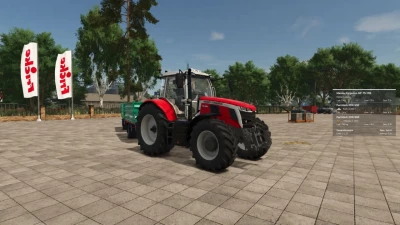
How heavy is your vehicle combination really? SmartWeight HUD brings a compact weight and cargo overview to Farming Simulator 25. Whether it’s a grain trailer, service vehicle, or timber transporter, you can see the breakdown of empty weight, cargo weight, and total weight right while driving.
Features
Separate weight display for the towing vehicle and attached trailers.
Empty weight, cargo weight, and total weight for each displayed vehicle, plus a grand total for the entire combination.
Display of fill types, fill levels, and mixed loads with corresponding icons.
Accounts for pallets, bales, and other objects secured with tension belts.
Timber cargo details including log count, volume (m³), and weight.
Support for tank, water, fuel, and service trailers, as well as visible integrated tanks.
Corrected weight calculation for service tanks and trailers with limited physics mass: the displayed empty weight does not decrease when additional cargo is added.
Timber Transport
Logs on timber trucks, trailers, and forwarders are accounted for as cargo. The HUD displays the number of logs, their volume, and their weight. Log weight already transferred to the vehicle via tension belts is not double-counted.
Additionally, timber loads already registered by AutoLoadWood and Universal Autoload are detected. Timber containers with fill levels retain their standard cargo calculation.
Important: On standard timber transporters, logs must be secured with tension belts. Alternatively, they must already be registered in a supported autoload list. Loose, unassigned logs and wood lying next to the vehicle are not automatically counted as cargo.
Your HUD, your settings
Customize the HUD size, font size, width, and background transparency to suit your needs. Choose from nine screen positions and five color schemes: blue, green, orange, red, and gray.
All settings are saved per player and restored after rejoining or a server restart. If the HUD is turned off, it remains off. The interface is available in German and English.
Weight Warning
The total weight is color-coded based on the load and weight:
Green: Vehicle combination without load, up to and including 40 tonnes.
White: Normal weight range with load.
Red: Loaded vehicle combination from 35 tonnes up to and including 40 tonnes.
Dark red with warning icon: Total weight exceeding 40 tonnes.
Color transitions are smooth. The warning thresholds are fixed HUD indicators, not vehicle-specific payload checks.
Multiplayer and Compatibility
SmartWeight HUD supports both single-player and multiplayer modes; log synchronization has been tested on a dedicated server with a connected client.
In multiplayer, the server provides the log count, wood volume, and original log weight. Unloading, switching vehicles, and joining a session with already loaded logging vehicles are all accounted for. While loading data is pending, the HUD displays a loading indicator.
Front loader arms, buckets, front weights, and other front attachments are attributed to the towing vehicle. Other connected implements remain part of the total combination weight. For standalone wheel loaders, telehandlers, front loaders, and skid-steer loaders, SmartWeight HUD remains hidden so that a separate loader weighing system can be used.
The mod does not alter vehicles, their driving behavior, or physical weight limits; it simply adds a display overlay.
Keybindings
Left Ctrl + Left Shift + W: Show/hide HUD.
Left Ctrl + Left Shift + S: Open settings.
Keybindings can be customized in the game settings. Version: 1.0.0.3
Author: xXDerManniXx
For multiplayer, the server and all players must use the same mod version.
- 0 Likes
- 0 Comments
- 2 Downloads
-
 2
Downloads in
2
Downloads in
-
 2 hours ago


 Report file


COMMENTS
There are no any comments
Write a comment