

The modification displays more information about the technique and adds several new features.
Version 1.1.3.1:
- Updating translations (on this version for the Russian translation is not relevant because of the last paragraph);
- Added sound of switching differentials;
- Built-in translation into Russian;
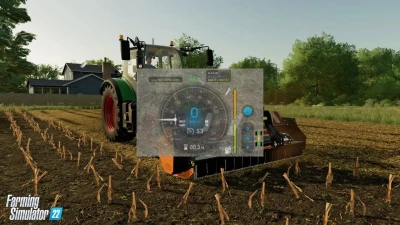
Adds directional steering (analogous to GPS/Guidance Steering), differential locks, 4WD modes and improved hydraulic control to your vehicle. It also shows more car details in the HUD.
The HUD displays:
- Damage values in % for the steered machine and all its attachments.
- Fuel level for Diesel / AdBlue / Electric / CNG and current fuel consumption.
- Current status of differential lock and 4WD mode.
- Current engine speed and temperature.
- The current weight of the steered machine and the total weight with all its attachments and loads.
Below is a list of control buttons:
!The full list can be viewed in the control settings!
- RCtrl+Num / - mod settings menu;
- RCtrl+End - fix the direction of movement or fix to the course;
- RShift+End - previous direction of movement;
- RCtrl+Home - rotate and fix the direction (180°);
- RShift+Home - on/off display of guide lines;
- RCtrl+PageUp and RCtrl+PageDown - change direction angle by 45°;
- RShift+PageUp and RShift+PageDown - change direction angle by 1°;
- RCtrl+RShift+PageUp and RCtrl+RShift+PageDown - change direction angle by 22.5°;
- RShift+Num / and RShift+Num * - headland distance;
- RCtrl+Num 7 - switch the differential on the front axle;
- RCtrl+Num 8 - switch the differential on the rear axle;
- RCtrl+Num 9 - switch drive mode (4WD/2WD);
- Num Enter - switch the parking brake mode;
- 4 Likes
- 1 Comments
- 1085 Downloads
-
 1
Downloads in
1
Downloads in
-
 4 years ago


 Report file


COMMENTS
How would I move the HUD over to the left of my screen as it is showing over implement and vehicle damage state
Write a comment