



FS 2011 / 2013 / 17, Modern & Arcade HUD (works with Zasty HUD or standalone)
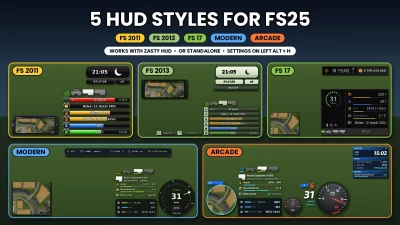
Five HUD styles for FS25 in one mod: play with the HUD of Farming Simulator 2011, 2013 or 17, with “Modern”, a clean modern vehicle HUD, or with “Arcade”, a HUD in the look of arcade street racing games. The mod runs on its own (Left Alt + H opens its settings window) and also works together with Zasty HUD, where all styles appear next to “Bar” and “Round”.
THE FIVE STYLES
FS 2011
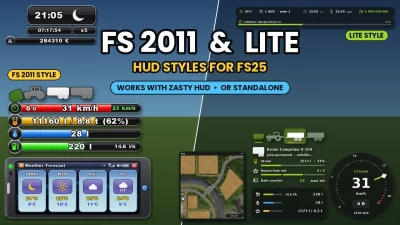
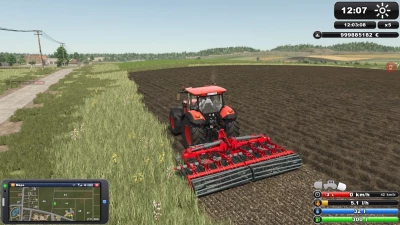
The classic glossy bar stack: speed with rpm fill, gear and cruise control, fill level in litres and tonnes, AdBlue and fuel with consumption
Vehicle schema above the bars: switched on (B) = green, selected (G) = brighter, lowered = tilted
Clock with weather symbol, real time and time scale, balance and contract bars under it
PDA phone bottom left with every tablet card and the PDA beep
F1 help in one glossy FS 2011 box
Backgrounds glossy or flat, background and PDA frame brightness / opacity
FS 2013
Olive bars with pale icon tiles: speed with gear, fill level, AdBlue, fuel with consumption
Operating hours (tenth in red) and cruise control as two small bars at the bottom
Pale clock box with weather symbol, real time and time scale, balance and contract bars under it
Dark green phone PDA with every tablet card, F1 help in an olive box
FS 17
Flat dark vehicle panel: dotted speed ring, operating hours, light symbols (beacon, low / high beam), rows for fuel, AdBlue, fill levels and bale counter, strip with the vehicle schema and cruise control
One bar top right with weather, clock, time scale and balance; contract progress under it
FS 17 minimap: thin frame, page key box, coordinates, green marker and field numbers
F1 help with every key in its own box, own clean font, own colours
MODERN
Tachometer: analog (dots or needle, rpm scale), digital or Retro (round dial with silver bezel, LCD speed and big gear, LCD fuel / AdBlue bars)
Fuel, AdBlue and fill level with slim bars, consumption next to the fuel
Vehicle schema (G) above the bars like the base game one, with the selected implement’s fill levels (e.g. net / twine rolls as segments), folding and lowering state, shop picture
Top bar (left or right): weather, date, time with time scale, real time, balance, contract progress
Tablet (key 9) in 5 looks
Basic, Tonal, Rounded, Retro-futurism, Modern glass
in 5 shapes (1:1, 4:3, 2:3, 5:2, 16:9); the look colours the whole Modern HUD and can be recoloured
ARCADE
Twin dials (tachometer and fuel) in 5 looks with night colours when the lights are on
Big gear digit, gear group badge, speed and cruise control speed
Game time, status (weather, real time, balance) and contract panels, round minimap
F1 help in the Arcade look, own italic font, own colours
IN EVERY STYLE
Every tablet card: map, weather forecast, prices, statistics, players (multiplayer), vehicles, engine, tyres (Variable Tire Pressure), farm, contract chosen per style; the weather cards take the look of the style
Map: north up, heading marker, coordinates, field numbers (yours in green), the game’s building icons, other players with their farm colour and name; map views Crop types, Growth, Soil and Farmlands with [ and ], map size and zoom
Bale counter (this session / total), bars of the selected implement (net, twine, seed, fertilizer …)
Settings window (Left Alt + H): one section per style, every part on / off, colours with separate brightness and opacity
Speed, volume and money follow your game settings (km/h / mph, litres / gallons, currency)
Languages: EN, DE, PL, FR, ES, IT, PT/BR, CZ, RU, NL, HU, TR
HOW TO USE
1. Put FS25_ZastyHUD_FS2011.zip into your mods folder (with Zasty HUD: next to FS25_ZastyHUD.zip)
2. Activate it in your savegame
3. Press Left Alt + H and choose the style; every style has its own section with its settings
4. Key 9 switches the tablet / PDA cards (one more press hides it), [ and ] switch the map views
REQUIREMENTS
None. Zasty HUD is optional; without it this mod runs standalone
NOTES
Zasty HUD’s own files are not changed; remove this mod and Zasty HUD works as before
Client side only, single player and multiplayer
Other mods that change the game HUD may overlap. Please report problems with your log.txt
Fonts: Exo 2 and Open Sans (SIL Open Font License 1.1, licence files included)
Original HUD designs of FS 2011, FS 2013 and FS 17: GIANTS Software, redrawn for this mod
CHANGELOG
1.19.0.0 – 1.29.0.0
New style “Arcade”: twin dials in 5 looks with night colours, big gear digit, own italic font, game time / status / contract panels, round minimap, F1 help, own settings and colours
New style “FS 2013”: olive bars with pale icon tiles, operating hours and cruise control bars, pale clock box with real time, time scale and balance, dark green phone PDA, F1 help, own settings
New style “FS 17”: vehicle panel with dotted speed ring, hours, light symbols, fill level rows, schema and cruise control strip; weather / clock / time scale / balance bar; F1 help with key boxes; FS 17 minimap; own font, colours and settings
“Lite” renamed to “Modern”; new mod name and icon
Modern: tablet with 5 looks and 5 shapes, the look colours the whole HUD and takes your colour changes
Modern: new Retro tachometer with silver bezel, LCD speed and gear, face brightness / opacity
Modern: vehicle schema like FS 2011 (colour = switched on, selected = brighter), right orientation, shop picture of the selected machine, fill level in percent next to the load bar
FS 2011: more options (time scale, real time, contract bars, consumption, bale counter, schema) and colours, extra bars for the selected implement, PDA map zoom, glossy / flat backgrounds with brightness, darker PDA frame with brightness and opacity, original font quality
Every tablet card in every style, chosen per style; weather cards in the look of each style; condition bar on the Vehicles card
Settings: one section per style, colours with separate brightness and opacity, pure black in the palette
All textures re-made with a better compression (no jagged edges)
Vehicle schema also shows machines that report “switched on” through the PTO or the pick-up
Removed the unloading pop-up
Fixed: FS 2011 colours after a restart, weather forecast days and weather types, map views in vehicles
V1.0 – 1.18
FS 2011 style, Modern (Lite) style, PDA / tablet with map and screens, map views, settings window, standalone mode, bale counter, contract card, translations
V2.9.0.0
New styles
New style “Arcade” in the look of arcade street racing games: twin dials (tachometer and fuel) in 5 looks with night colours, big gear digit, own italic font, game time / status / contract panels, round minimap, F1 help in the Arcade look, every Modern function, own settings and colours
New style “FS 2013”: the HUD of Farming Simulator 2013, redrawn olive bars with pale icon tiles, operating hours and cruise control bars, pale clock box with real time, time scale and balance like FS 2011, dark green phone PDA with every tablet card, F1 help, own settings
New style “FS 17”: the HUD of Farming Simulator 17, redrawn vehicle panel with dotted speed ring, operating hours, light symbols, fuel / AdBlue / fill level rows, schema and cruise control strip; weather / clock / time scale / balance bar; F1 help with key boxes; FS 17 minimap; own font, own colours and settings
“Lite” renamed to “Modern”; new mod name: FS 2011 / 2013 / 17, Modern & Arcade HUD (works with Zasty HUD or standalone)
Modern
Tablet (key 9) with 5 looks: Basic, Tonal, Rounded, Retro-futurism, Modern glass; the look colours the whole Modern HUD; tablet shape 1:1, 4:3, 2:3, 5:2 or 16:9
Tablet looks take your colour, brightness and opacity changes (kept per look)
New Retro tachometer: round dial with silver bezel, deep black face, LCD with speed and a big gear, LCD bars for fuel and AdBlue, face brightness and opacity settings
Vehicle schema (G) works like FS 2011: colour = switched on (B), selected = brighter, no frame, left aligned, constant picture size, pictures face the right way, shop picture of the selected machine
Fill level in percent next to the load bar
F1 help moves right when the top bar is on the left
Needle and rpm scale options only shown for the analog tachometer
FS 2011
More options (time scale and real time under the clock, contract bars, consumption on the fuel bar, bale counter, vehicle schema) and colours
Extra bars for the selected implement (net / twine rolls, seed, fertilizer …)
PDA map zoom (x0.5 – x3)
Backgrounds glossy (original) or flat, background brightness 0-100 % (0 = true black)
PDA (phone) frame darker, with brightness and opacity settings
Original FS 2011 font quality
All styles
Every tablet card (map, weather, prices, statistics, players, vehicles, engine, tyres, farm, contract) in every style, chosen per style in the settings
Weather forecast card in the look of each style
Condition bar on the tablet’s Vehicles screen
Settings window: one section per style; colours with separate brightness and opacity, opacity 0-100 %, pure black in the palette
All textures re-made with a better compression: no jagged, blocky edges
Vehicle schema also shows machines that report “switched on” through the PTO or the pick-up (loader / forage wagons, balers)
Removed the unloading pop-up in the middle of the screen
Fixes
FS 2011 colours were loaded wrongly after a restart (black texts, the settings tab could not open)
Weather forecast reads the right days (today + 3) and shows the game’s weather types (sun, partly cloudy, cloudy, rain, snow, hail, thunder)
Map views ([ and ]) now also switch in vehicles, not only on foot
 Report file


COMMENTS
There are no any comments
Write a comment